
Blue Archive Gameplay Guide: Combat and Squad Basics
Learn how Blue Archive gameplay works, from real-time battles and six-student squads to skill timing, student upgrades, and MomoTalk relationship stories.
Jump to

How Combat Works in Blue Archive
Your students handle the shooting, but your skill decisions help shape the fight. Blue Archive gameplay combines automatic attacks with manually activated abilities, making squad preparation and timing central to combat. You play as Sensei, guiding students through real-time battles and getting to know them between missions in Kivotos.
During combat, students attack enemies independently. Your direct involvement comes through their skills: choose when to activate an ability and aim its target or affected area through the skill interface.
Watch what happens before spending an ability. Check which enemies remain and where they are positioned, then aim the skill where its effect will help your squad. Repeatedly activating abilities without watching the battlefield gives you less control over their value.
Think of each encounter as a test of both preparation and execution. If a fight goes poorly, review your lineup alongside your skill choices.
Build a Squad Around Complementary Roles
A full squad can contain up to six students: four Strikers and two Specials. Those slots give you room to combine different abilities rather than relying on one character to carry every encounter.
 Image: Steam / NEXON Games
Before entering a mission, preview the enemy lineup. Enemies and students have attack and armor attributes, so choosing suitable matchups is part of team building.
Use this preparation checklist:
- Read student abilities. Identify what each student contributes before adding them to the squad.
- Inspect enemy attributes. Compare their armor with your available attack types.
- Balance the lineup. Combine abilities that address the encounter’s demands.
- Review the result. After a failed attempt, identify whether the problem was survival, damage, or skill use before changing the team.
Recruiting expands your tactical options through the gacha system. New students bring different combat abilities and their own stories, giving you more combinations to explore.
Look for a specific gap in your current squad before deciding whom to develop next. Use a student's abilities and fit with the team to guide that decision.
Understand Normal and Hard Missions
Campaign missions offer Normal and Hard difficulties. Hard stages provide Character Elephs, which are used for student recruitment and rarity progression.
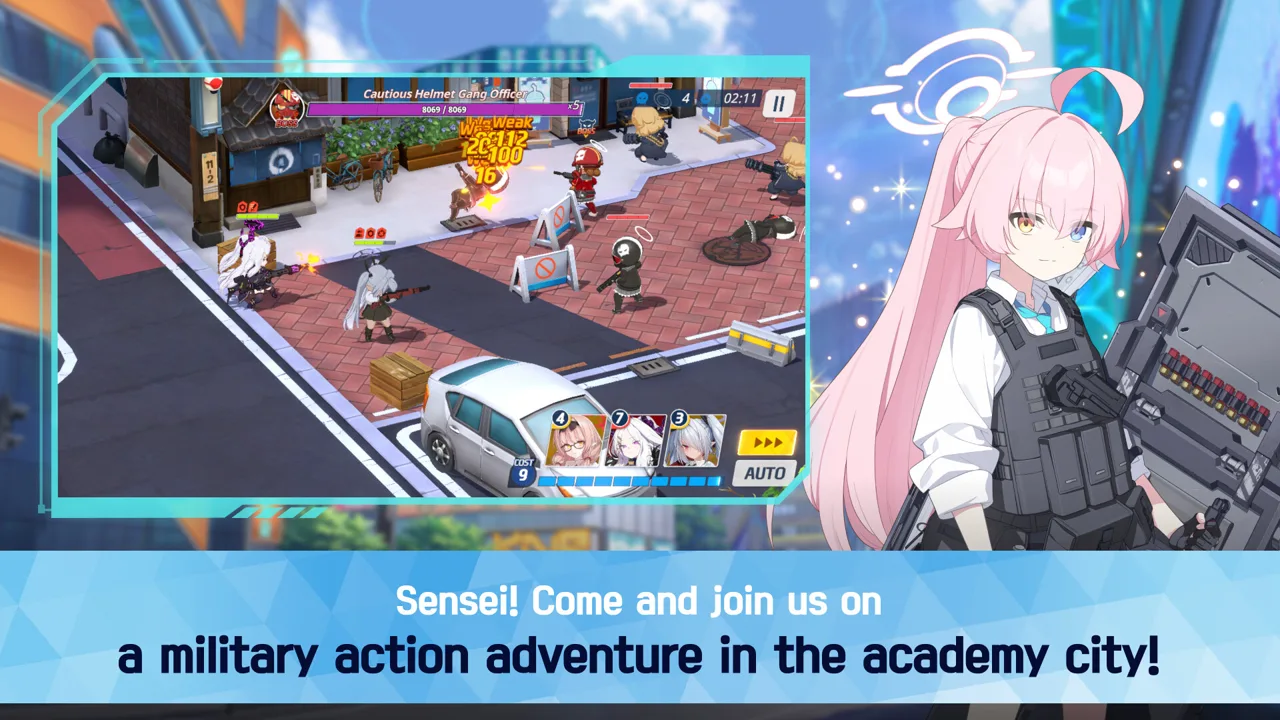 Image: Steam / NEXON Games
Stage objectives also matter. Missions can ask you to clear the stage, earn a specified number of S ranks, or finish within a turn limit. Completing objectives awards additional rewards, including Pyroxenes.
Read the objectives before starting. A victory alone does not necessarily satisfy every requirement, so plan around the stage’s full checklist.
For each mission:
- Inspect the enemy lineup and attributes.
- Read the clear conditions and additional objectives.
- Select students whose abilities suit the encounter.
- Review any missed objectives before attempting the stage again.
Keep those goals distinct when evaluating an attempt. Clearing a difficult battle and completing every stage objective are separate targets.
Upgrade Students Within Your Sensei Level
Your Sensei level is your account level, and it sets the maximum level your students can reach. Student development therefore depends partly on account progression.
 Image: Steam / NEXON Games
Spending Action Points, or AP, contributes to Sensei experience. Activity Reports provide student experience, while equipment and skill upgrades offer additional ways to strengthen your squad.
The main upgrade areas to review are:
- Student level: Raise it with Activity Reports, within your account’s level limit.
- Equipment: Develop the gear supporting your students.
- Skills: Improve abilities alongside levels and equipment.
Activity Reports come in Novice, Normal, Advanced, and Superior varieties. Base Defense stages within Commissions provide a way to obtain them.
When a student reaches your current level cap, inspect their equipment and skills. Those systems give you other development decisions to consider while you continue raising your Sensei level.
Read the ability being upgraded before spending materials. Connect each investment to something your squad needs in battle.
Use MomoTalk to Explore Student Stories
Combat is only part of your time in Kivotos. The story follows Sensei’s work with students, clubs, and academies, while relationship episodes focus on individual characters.
Interactions in the café and during lessons help strengthen relationships. MomoTalk lets you continue those connections through messages and character episodes.
Make time for these conversations between missions. They reveal personalities and motivations beyond a student’s combat role. Relationship progression can also unlock animated lobby scenes for individual students.
Follow the characters who interest you, and read their episodes alongside the larger school stories. Squad building gives students a battlefield role; their conversations give that role personal context.
Playing on PC
The Windows version offers a native PC option for managing battles and reading stories on a larger screen. You can download Blue Archive on Steam.
Its PC features include:
- Free-to-play access with in-app purchases.
- Single-player gameplay.
- A mouse-only control option.
- Subtitle options and custom volume controls.
Minimum PC requirements include Windows 10, an Intel Core i3 - 540 3.06 GHz processor, 4 GB RAM, a GeForce GTX650Ti, DirectX 11, and 19 GB of available storage. A 64-bit processor and operating system are required.
Continue with
 Blue Archive Guide: Beginner Tips for Steady ProgressStart strong with this Blue Archive guide covering mission progress, team matchups, Pyroxene saving, student upgrades, and daily tasks for new Senseis.
Continue exploring
Join the community
Official channels for news, updates and player help: